Table of contents
What is AddROM FRP Bypass?
AddROM FRP Bypass is a small and simple tool for Android to bypass FRP lock Google Account verification. It is specially developed for bypassing FRP (Factory Reset Protection) lock from Android smartphones and tablets. It will be working fine on any Android device without a PC.
It doesn’t require any third-party software and it is the best, free, and secure way to bypass FRP lock from any smartphone or tablet having any Android version. It is fully compatible with all Android versions. So you don’t need to worry about it.
AddROM Supported Android Versions
- Lollipop 5.0
- Marshmallow 6.0
- Pie 9.0
- Nougat 7.0
- Oreo 8.0
- Android 10 Q devices.
Benefits of Using AddROM FRP Bypass
- Easy to Use: AddROM FRP Bypass is user-friendly and easy to use, even for those who are not tech-savvy. The software has a simple, straightforward interface, and requires no technical knowledge to use.
- Safe and Secure: AddROM FRP Bypass is safe and secure to use. The software does not modify the Android operating system or harm the device in any way. It simply bypasses the FRP lock and allows you to access your device.
- Fast and Reliable: AddROM FRP Bypass is fast and reliable, and the bypass process usually takes only a few minutes to complete. The software is designed to work with most Android devices and is regularly updated to support the latest models.
Download AddROM FRP ByPass Tool APK
| File Name | AddROM_ByPass.APK |
| File Size | Unknown |
| File Type | APK |
| Supported Android Version | Android 5, 6, 7, 8, 9, 10 |
| Publisher | allmobiletools.net |
How Does AddROM FRP Bypass Work?
AddROM By taking advantage of a flaw in the Android operating system, FRP Bypass operates. The software effectively eliminates the requirement for you to enter your Google account credentials by creating a new firmware image with a modified version of the Google account verification process. You can create a new account or access your smartphone without entering your Google account details after installing the app because it automatically reboots the device and removes the FRP lock.
Conclusion:
If you have forgotten your Google account password or the email address you used to set up your Android device, AddROM FRP Bypass is the perfect solution for you. The software is easy to use, safe and secure, and fast and reliable. With AddROM FRP Bypass, you can bypass the FRP lock and regain access to your device in just a few minutes.
The post AddROM FRP Bypass 2025 APK Download – Bypass Google Account appeared first on AllMobileTools-Tutorials, Stock Firmware, Tools, USB Drivers.
]]>Table of contents
What is FRP?
FRP, or Factory Reset Protection, is a security feature included in the Android operating system by Google. After a device has been reset to factory settings, FRP is designed to stop unwanted access. A device with FRP enabled will ask the user to enter the Google account credentials linked to the device when it is reset before it can be used again. This makes it harder for a thief or other unauthorized person to access the device’s data in the event that it is lost or stolen. On Android smartphones running Android 5.1 Lollipop or later, FRP is enabled by default.
What is vnROM Bypass APK?
VnROM FRP Bypass APK latest version free download for Android. It is also known as Net Bypass APK. It removes the Google FRP lock from your Android device. Unlock FRP lock on your Android device without a PC. Download the latest version of this FRP Bypass APK by clicking on the direct links given at the bottom of this page.
How To Use VnROM to Bypass FRP Lock?
If you want to know how to use VnROM Net Bypass APK? Follow me in the below simple steps.
- Switch on your phone and connect your phone to a Wifi network.
- Download the VnROM FRP Bypass APK from the above link.
- Install the downloaded APK on your Android Device.
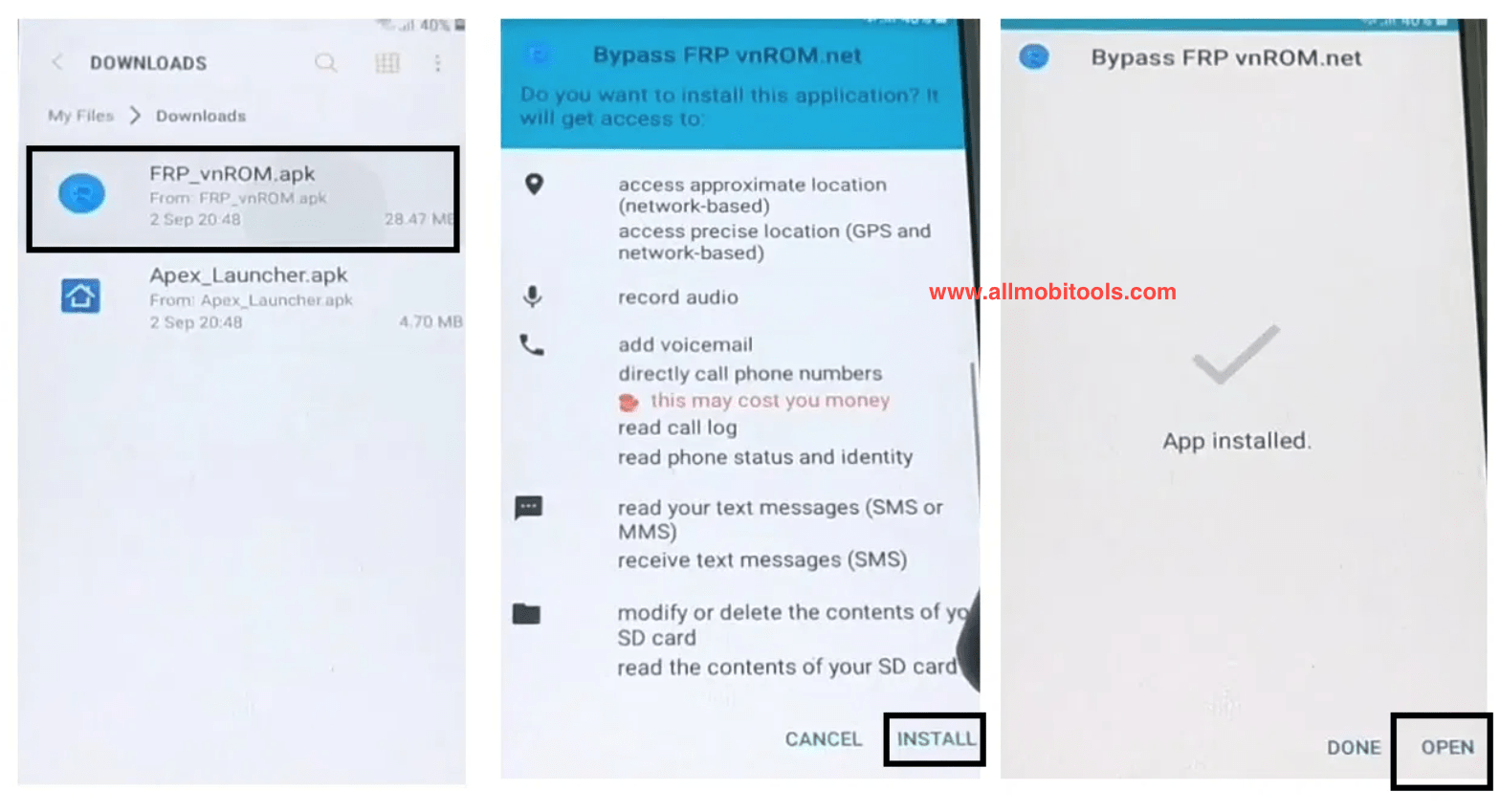
- Now Download Apex launcher APK and install it.
- Open Apex Launcher and Disable Find My Device. See the screenshot below.
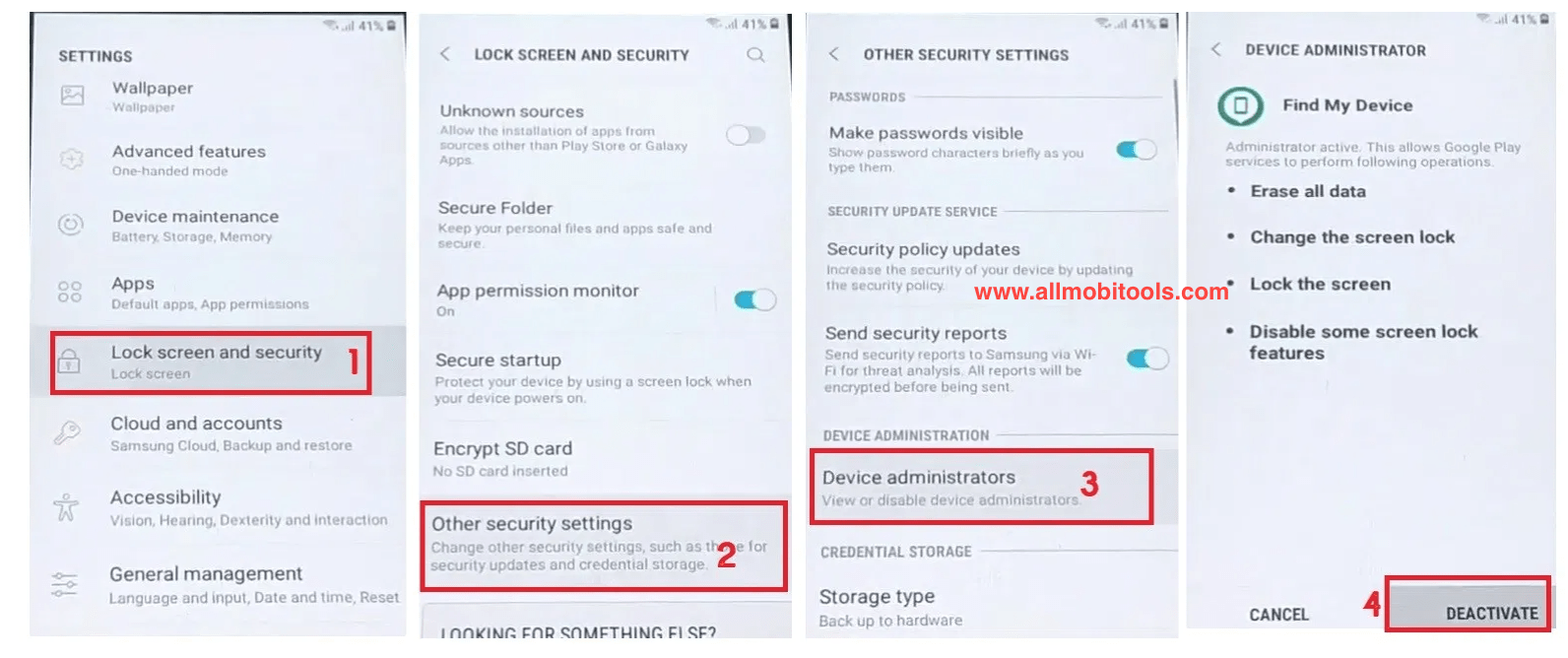
- Now go back to the settings and disable Google Play Services. See the screenshot below.
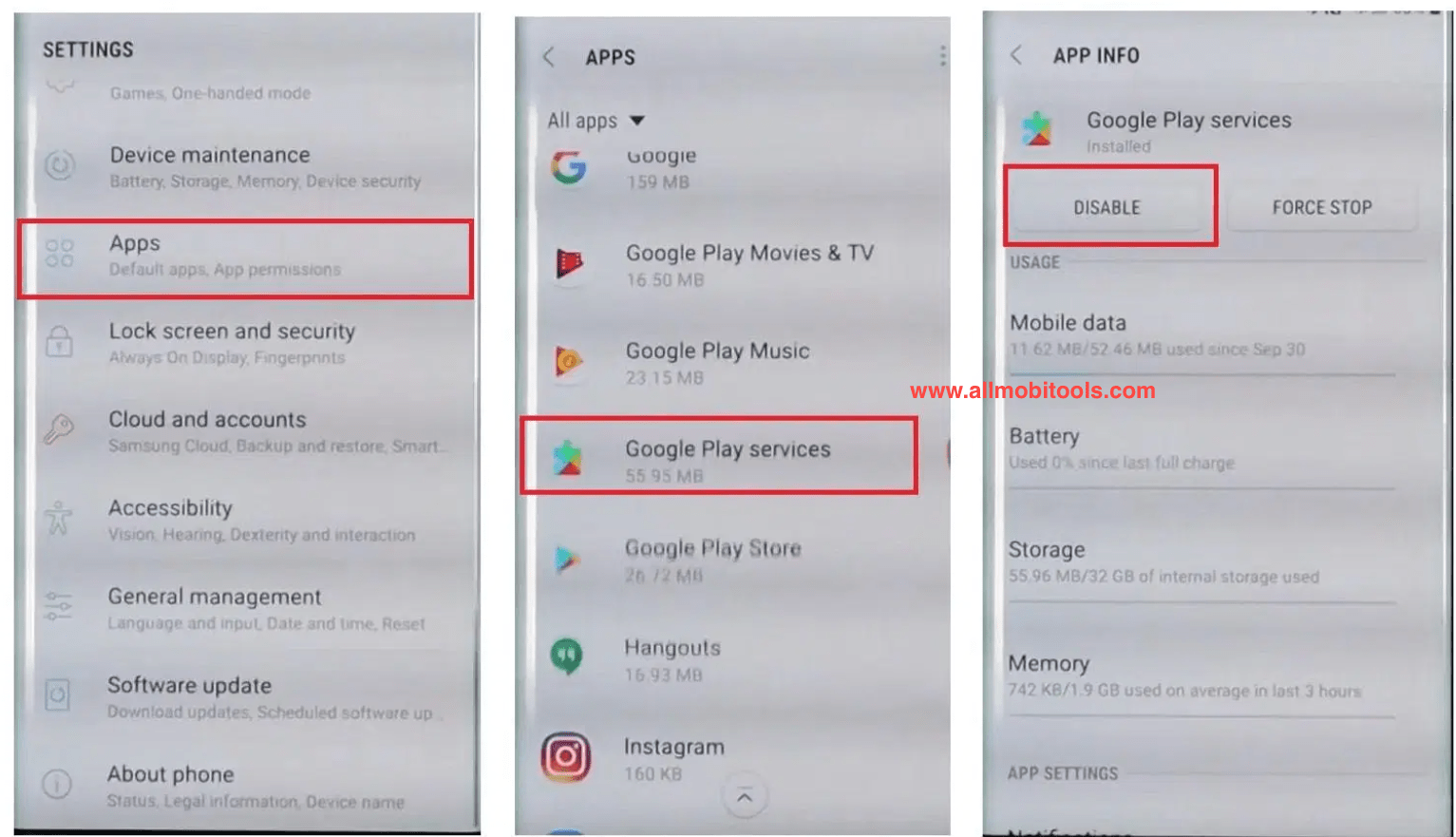
- Now add a Google Account by going to Settings > Accounts > Add Account > Google. See the screenshot below.
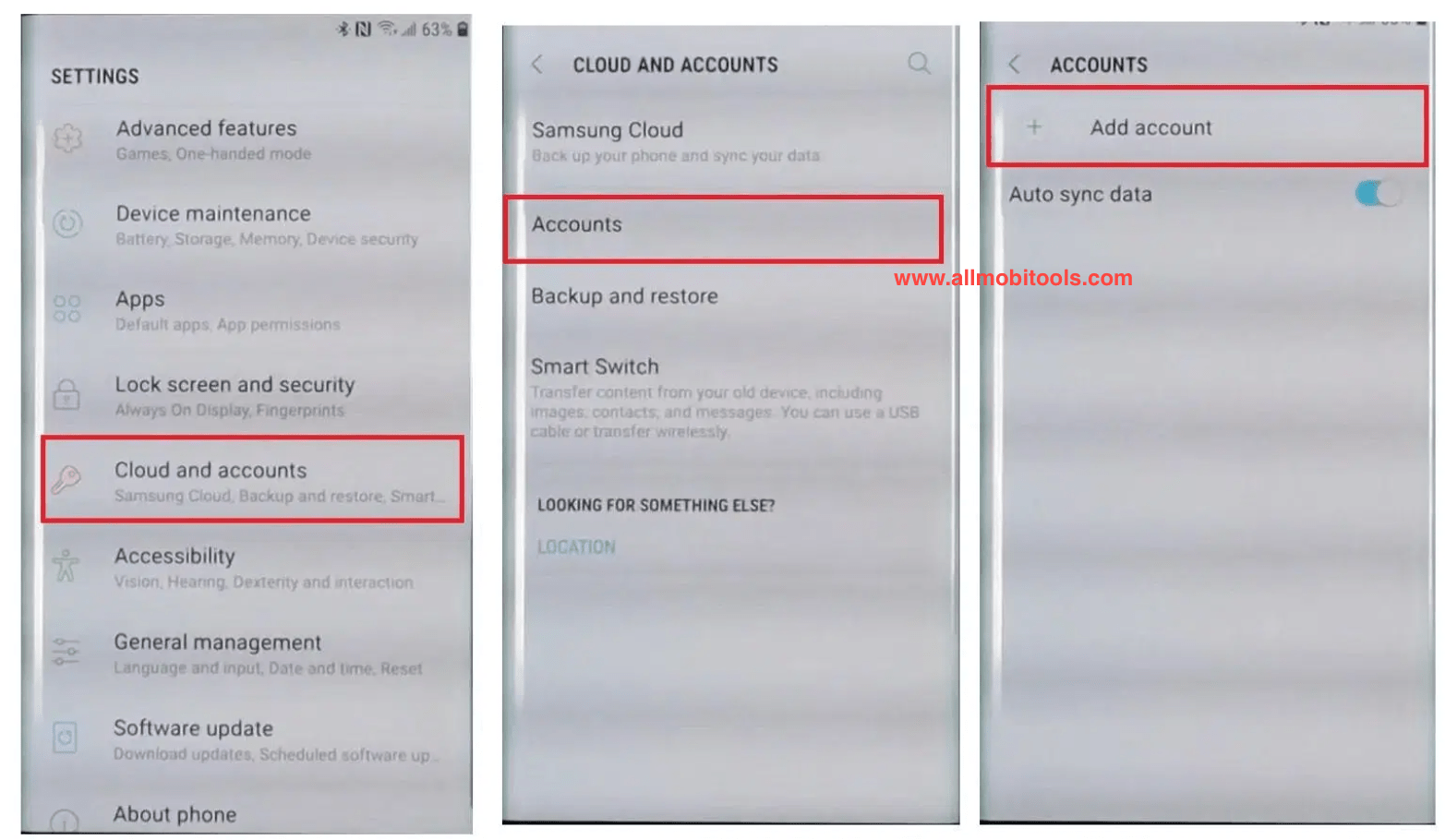
- Now Enable all the Disable services from Apps and security.
- Finally, reboot your phone and setup your phone.
- All done.
I hope the above guide will help to you remove the FRP lock from your Android devices. If you need any further assistance feel free to post a comment below or directly contact us through the Contact US page.
Conclusion:
If your device is locked with FRP and you are looking for the best and quick way to bypass it? Then vnROM is for you. You don’t need any technical skills to use this tool. It has a simple, clean, and user-friendly interface that makes it easy to understand. No, you don’t need to go to a mobile repair shop to fix your phone issues. Stay tuned with the AllMobiTools website to get solutions for every problem of your phone. Enjoy.
The post vnROM FRP Bypass 2025 APK Download – All Bypass Google Account appeared first on AllMobileTools-Tutorials, Stock Firmware, Tools, USB Drivers.
]]>Table of contents
GsmNeo FRP is compatible with numerous smartphone manufacturers. It works with the most popular Android smartphones’ most recent iterations.
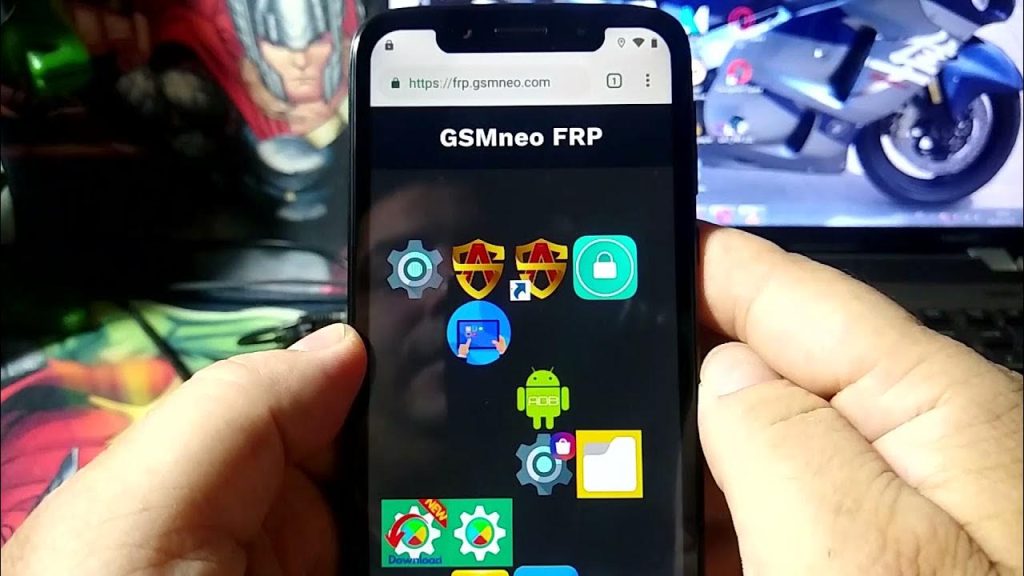
Beginners will find the app’s tutorial on how to use it to be of great assistance. Additionally, YouTube has a tonne of information that might teach you more about it. The app is also available for download from the official website.
Since the program doesn’t need any special permissions, installing it on most smartphones is secure. However, you should refrain from installing it if your phone is experiencing any sort of technical problem.
You must first download and install the GSMNeo APK in order to begin. Then, you can sign up for a fresh Google account on your gadget. After that, you can make use of the tool to unlock the FRP lock.
GsmNeo FRP is compatible with Huawei, Samsung, and Oppo mobile devices. It may also be put into rooted mobile devices.
GsmNeo FRP comes with a tutorial, so you’ll have all the instructions you need. You’ll also find advice about how to bypass the FRP lock. Eventually, you’ll be able to access your data and use your phone as you wish.
The tutorial that comes with GsmNeo FRP provides all the instructions you want. There is also guidance on how to get around the FRP lock. You’ll eventually be able to use your phone and access your info as you, please.
All GSMNeo FRP Direct Apps, APKs, and Tools
GSMNeo FRP Direct Open Apps
GSMNeo FRP All APKs
- Alliance Shield apk
- QuickShortcutMaker 2.4.0
- Bypass FRP 2.0
- Notification Bar apk
- Easy Frp Bypass
- FRP Bypass apk
- FRP Android 7 apk
- Package Disabler Pro apk
- Google Setting.apk
- Remote 1.apk
- FRP vnROM apk
- technocare.apk
- Setting.apk
- Development_Setting.apk
- Smart switch.apk
- Menu Button apk
- Nova Launcher apk
- HushSMS apk
- FrpAllSamsung.apk
- Apex_Launcher.apk
- Phone Clone apk
- Test_DPC.apk
- Start Hotspot*Root_Wifi.apk
- ES File Explorer.apk
- FRPFile SMS v2.apk
- File Commander Manager apk
- Play Service apk
- Huawei Phone Clone
- Magisk apk
- Knox Checker apk
- Kids apk
- Notification apk
- Geek Lock Account APK
- EFT SU Manager apk
GSMNeo FRP Google Account Manager (GAM APK All Versions)
| Google Accounts Manager APK All Versions By GSMNeo FRP |
|---|
| Google Account Manager Android 5 |
| GoogleAccount Manager Android 6 |
| Google Account Manager Android 7 |
| Google Account Manager Android 7.1 |
| GoogleAccount Manager Android 8 |
| Google Account Manager Android 9 |
| Google Account Manager Android 10 |
| GoogleAccount Manager Android 11 |
| Google Account Manager Android 12 |
| Google Account Manager Android 13 |
How to Use GSM Neo FRP:
- Download the Neo GSM FRP given here according to the Android version of your phone
- Find that application in the download folder and install it.
- Open the installed application and enter your new gmail id and password.
- If this method is not working in your mobile phone and you can remove frp lock by other method.
- Second method can remove FRP lock by setting lock screen in your phone. You can see the video tutorial given below.FRP File Bypass
The post GSMNeo FRP Bypass All APK Download Free 2025 [Updated] appeared first on AllMobileTools-Tutorials, Stock Firmware, Tools, USB Drivers.
]]>Table of Contents
QuickShortcutMaker FRP Bypass
A quick and easy way to bypass the FRP lock on your Android phone is by using the QuickShortcutMaker FRP Bypass apk. This app works on any Android phone from Lollipop 5.0 to Android Marshmallow 6.0, including the latest, most advanced, Pie 9.0 version. It’s also able to bypass the FRP lock on Google account-protected devices.
While FRP has first introduced on Android 5.1 Lollipop and is now present on higher versions, it is a nuisance. If you’re planning to root or flash a custom ROM, you’ll most likely be locked out of your phone until you confirm your GMAIL ID. Fortunately, a new application called Quick Shortcut Maker will help you bypass the FRP lock and keep your phone free from security restrictions.
After installing Quick Shortcut Maker, you’ll see a list of installed applications. Click on the application to test it out. It’s possible to edit the application’s name, icon, and behavior by clicking on the ‘Try’ button. After you’ve installed the app, you’ll be able to edit the application’s name and icon. If you want to bypass FRP protection, you can select the ‘Try’ option to try the application for yourself.
Another good reason to download the application is that it lets you quickly search for applications in your phone’s installed applications list. It can bypass the activation lock of your Google Account, allowing you to access some features of your phone that require an active internet connection. Once you’ve done this, you’ll see that you’re free to launch your favorite apps. You can even launch a search by writing the application name.
QuickShortcutMaker Supports Multiple Languages
Multilingual support is a necessity in today’s global economy, where large corporations have offshore plants and offices across the world. Multilingual support requires software that is capable of supporting more than one language. InfoRouter supports internationalization fully and includes multiple languages out of the box. If additional languages are desired, the software can be translated to a new language. The following are some of the best practices for implementing multilingual support in your web applications.
Supports in-app Shortcuts
The iOS 11 release supports in-app shortcuts, but not all apps support them. This feature lets you make a shortcut to an action that you already use or are currently using in another app. The shortcuts are available in the Quick Actions menu, Touch bar, and menu bar. The only drawback is that they don’t work within the current app. For example, a shortcut to a URL won’t be available in Photos.
Download QuickShortCutMaket Latest Version
| File Name | Link |
|---|---|
| Quickshortcutmaker_latest.apk | Download APK |
How To USE QuickShortcutMaker to Bypass FRP Lock?
- First of all, Powered on your FRP Locked device.
- Connect your locked phone to a Wifi network.
- Then you have to access chrome or any other Internet browser
- Once you successfully access the Chrome Browser,
- Download the QuickShortcutMaker APK from the given link.
- Once downloaded. Install it on your device as shown in the screenshot below.

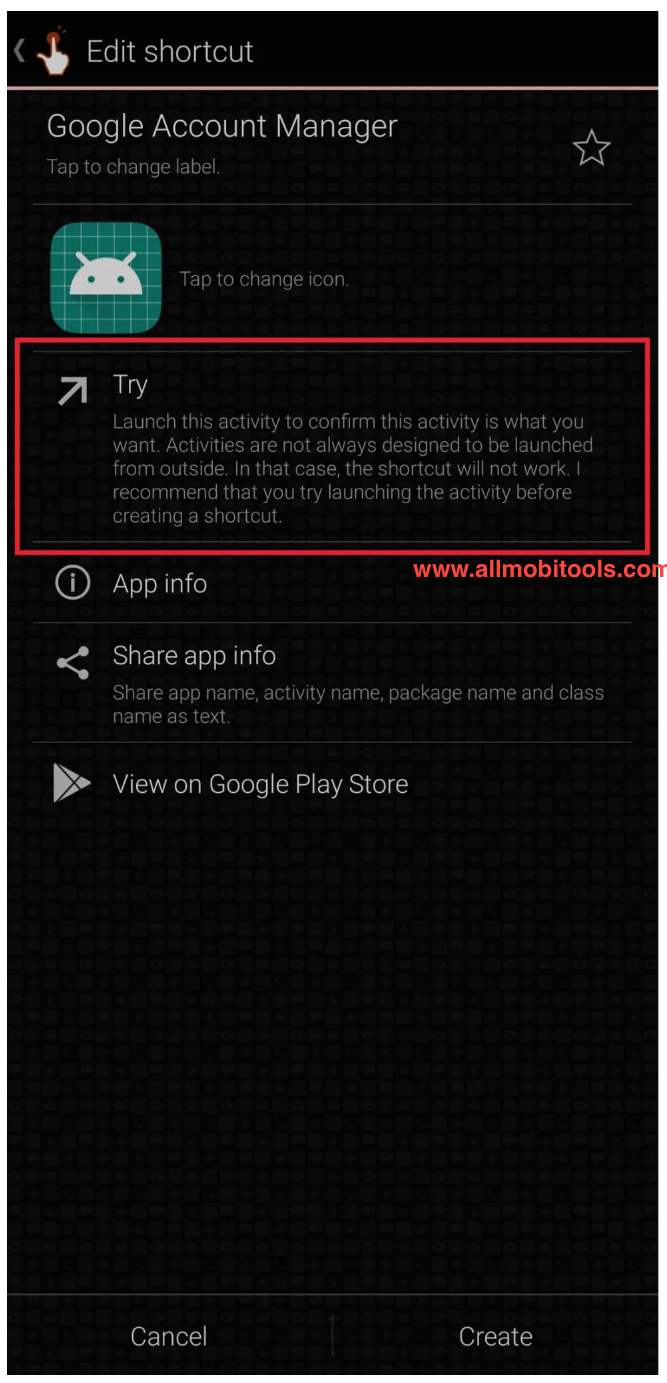
- Now search for Google Account Manager.
Now select the Google Account Manager that has the “Type Email & Password” option. See the screenshot below.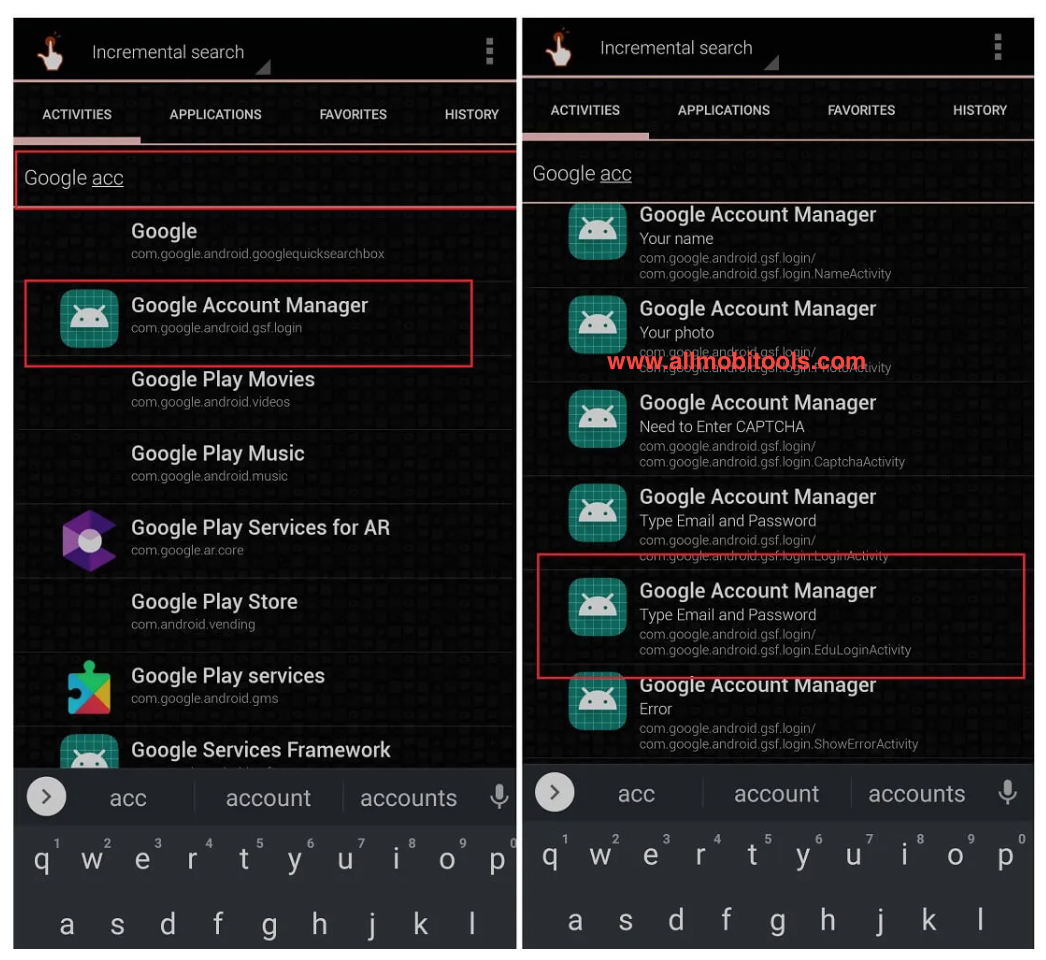
- Tap Try. See the screenshot below.
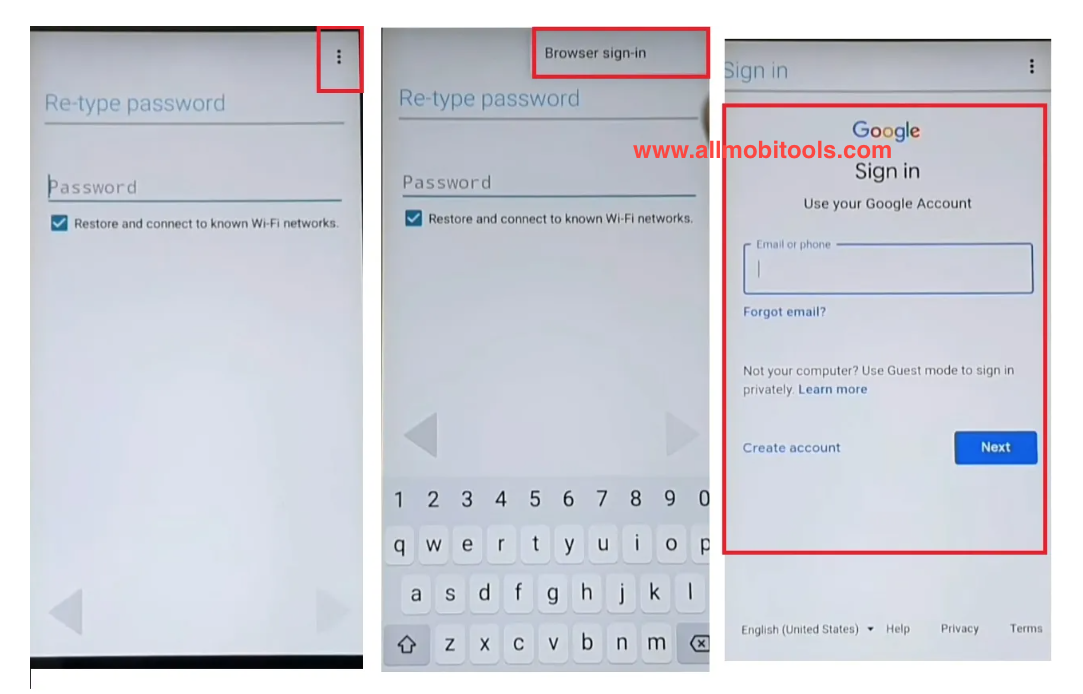
- Tap on the 3 dot option from the top right corner and select the browser sign in option and enter any Google account and password. See the screenshot.
- You can see Account Added, Which means FRP or Google Account has been successfully bypassed.
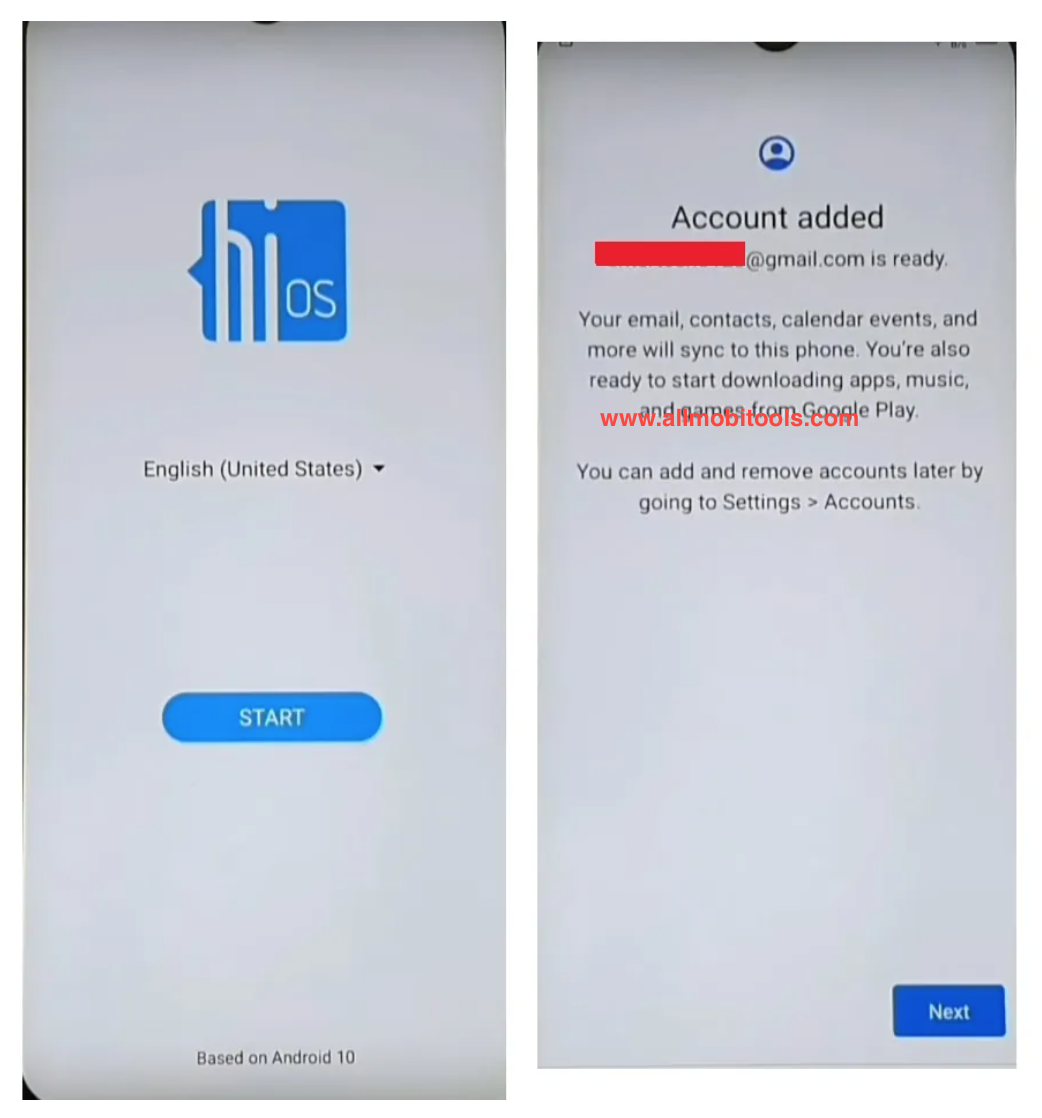
- Finally, restart your phone and enjoy.
Other FRP Bypass APK Tools
The post QuickShortcutMaker FRP Bypass APK Download Latest Version 2025 appeared first on AllMobileTools-Tutorials, Stock Firmware, Tools, USB Drivers.
]]>Table of Contents
How MSA FRP Bypass Works
What is Factory Reset Protection (FRP)?
FRP protects Android devices from unauthorized access. The gadget encourages users to enter their Google account after a factory reset. This layer protects data even if the device is stolen.
Why Bypass FRP Lock?
FRP is a crucial security mechanism, however, users may forget their Google account credentials or buy a used device with FRP activated. MSA FRP Bypass APK can help.
MSA FRP Bypass APK Functionality
MSA FRP Bypass APK is designed to bypass the FRP lock on Android devices. It allows users to regain access to their devices by unlocking the FRP-protected devices. The APK is lightweight, user-friendly, and compatible with a wide range of Android devices.
More Benefits
Quick and Easy Unlocking Process
MSA FRP Bypass APK offers a seamless and straightforward unlocking process. With just a few clicks, users can bypass the FRP lock and gain access to their devices, saving valuable time and effort.
Works on Various Android Devices
One of the most significant advantages of MSA FRP Bypass APK is its versatility. It is compatible with numerous Android devices from various manufacturers, making it a reliable solution for many users.
No Technical Knowledge Required
Using the MSA FRP Bypass APK does not require any technical expertise. The step-by-step process is designed to be user-friendly, ensuring that even less tech-savvy individuals can use it with ease.
Free of Cost
MSA FRP Bypass APK is available for free. Users can download and use the APK without incurring any charges, making it a cost-effective solution for FRP-related issues.
Step-by-Step Guide to Use MSA FRP Bypass APK
Precautions Before Using the FRP Tool
Before proceeding with the FRP bypass process, it is essential to ensure that the device’s battery is sufficiently charged to avoid interruptions during the unlocking process.
Downloading and Installing the APK
To begin, users need to download the latest version of the MSA FRP Bypass APK from a trusted source. After downloading, the APK can be installed on the device by following the on-screen instructions.
Step-by-Step Bypass Process
Once the APK is installed, users can launch it and follow the step-by-step instructions provided within the application. The process typically involves connecting the device to a Wi-Fi network and navigating through a series of prompts to unlock the FRP-protected screen.
Troubleshooting Tips
In some cases, users may encounter challenges during the FRP bypass process. MSA FRP Bypass APK often provides troubleshooting tips to address common issues and ensure a successful unlock.
Frequently Asked Questions (FAQs)
What is Factory Reset Protection (FRP)?
Factory Reset Protection (FRP) is a security feature on Android devices that requires users to enter the Google account linked to the device after performing a factory reset.
Is MSA FRP Bypass APK Legal?
MSA FRP Bypass APK is intended for personal use to unlock devices owned by the user. Using it to bypass FRP on stolen or unauthorized devices is illegal.
Does it Work on all Android Devices?
It is designed to work on a wide range of Android devices. However, the success of the bypass may vary depending on the device’s make and model.
Can it Damage My Device?
When used as instructed, MSA FRP Bypass APK is unlikely to damage the device. However, it is essential to follow the instructions carefully to avoid any potential issues.
How Often Does it Get Updated?
MSA FRP developers update regularly to support the latest Android versions and security upgrades.
Conclusion
Finally, MSA FRP Bypass APK is a valuable tool for Android users facing FRP-related issues. Its user-friendly interface, compatibility with various devices, and cost-effectiveness make it a preferred choice for many. However, it is crucial to use this APK responsibly and only on devices owned by the user. With MSA FRP Bypass, users can regain access to their devices and enjoy the seamless Android experience.
Best Alternatives to MSA FRP Bypass APK
Download MSA FRP Bypass APK
| File | Link |
|---|---|
| MSA_FRP_Bypass.apk | Download MSA FRP APK |
The post MSA FRP Bypass APK Download Latest 2025 for Android appeared first on AllMobileTools-Tutorials, Stock Firmware, Tools, USB Drivers.
]]>Table of contents
What is FRP Bypass APK?
FRP is also known as factory reset protection. It is a type of security that is developed by Google LLC. It protects your device in case of you lost it. It is not an easy task to bypass FRP Lock because it needs Google account access.
Download FRP Bypass APK Latest Version
| frp_bypass_apk_by_allmobiletools.net.apk | Download FRP Bypass APK 2.0 |
FRP Bypass APK Supported Mobile Brands
- Samsung
- Huawei
- Vivo
- Oppo
- LG
- Tecno
- Micromax
- Infinix
- Xiaomi
- Sony
- Acer
- Alcatel
- Allview
- Amazon
- AMOI
- And many other mobile brands…
How To Bypass FRP with OTG?
If you want to bypass FRP lock with OTG, then follow me in the below simple steps.
- Download the FRP Bypass APK from the above link.
- Once the download completes copy it on your USB drive.
- Now start your device on which you want to bypass FRP.
- Next, a setup wizard will open where you need to follow the basic instructions.
- Once the bypass factory reset protection screen appears. You will need to enter google account login credentials.
- But because of the reason you lost your phone or don’t remember it, you will need to try something other.
- By using an OTG cable you need to connect your USB Drive to your android device.
- Once you connect your USB drive to your android device, you will see file explorer opening on your device.
- Before installing the APK file make sure you have enabled the Unknown Source option on your android device. To do so simply go to your device settings and turn on the unknown sources option.
- Now install FRP Bypass APK on your android device.
- Once the APK installed. It will open the setting menu on your device.
- In settings scroll down select backup, and reset option. Then tap on factory data reset and tap on the confirm button.
Congrats: You have successfully removed the FRP lock from your android device.
Requirements for FRP Bypass APK
- Android Lollipop or up.
- Internet access is required to download required files.
- Windows PC.
How To Bypass FRP Wihtout OTG?
In the above method, we need an OTG cable to bypass FRP Lock from our android device. But in this method, we don’t need an OTG cable to bypass FRP Lock. We just need internet access to do so.
- Switch on your android device and you will see a setup wizard on your device screen. See the screenshot below.
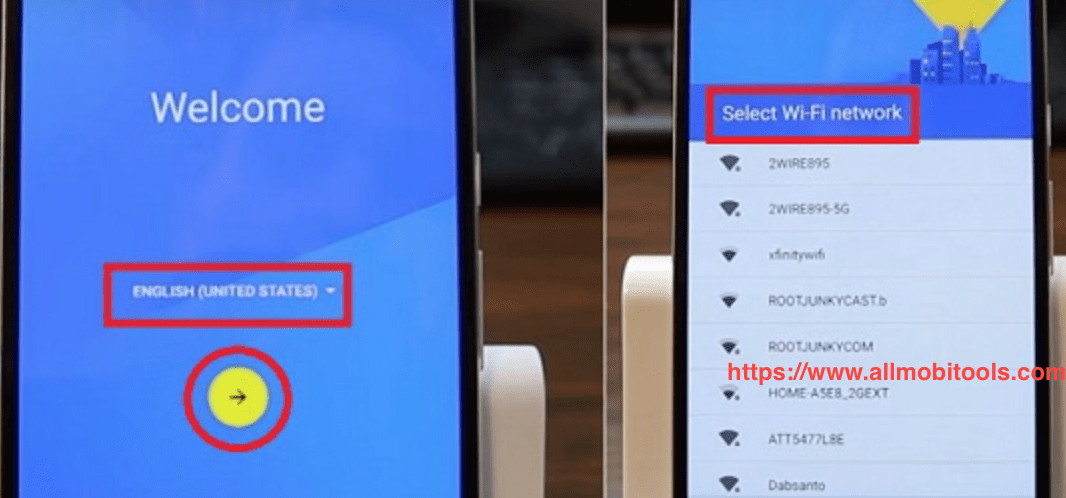
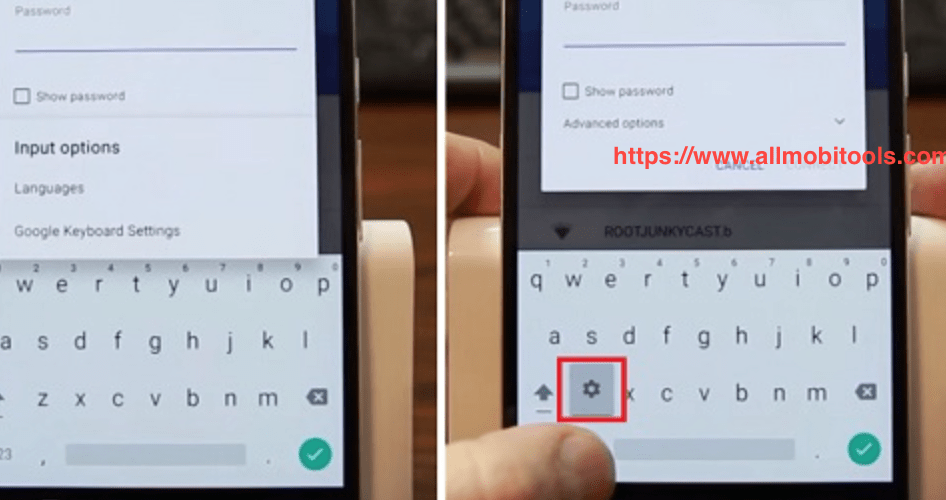
- Follow the options that appear on your device screen, once you see the FRP bypass tool screen shows. You will need to open your keyboard and tap on its settings. See the screenshot below.
- Now tap on the Menu button and then Help and then Feedback.
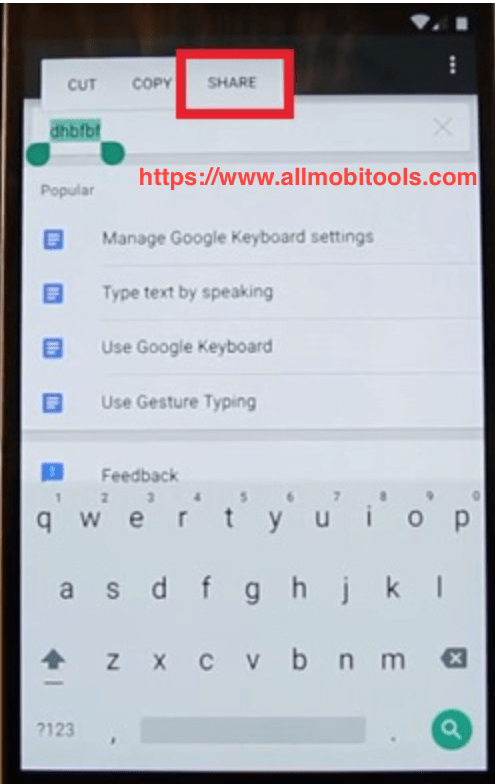
- Write something on the feedback box and click on the Share button. See the screenshot below.
- After that choose a messaging option, then a new message, and type any number in the “To” section. Next, choose it and tap on the contacts icon.
- Next tap on the call icon button and tap on the new call option. Once the dial pad opens, you will need to type *#*#4636#*#*
- Now tap on the usage statistics option and tap on the back button. You will then go to the settings menu.
- Then you will need to tap on the backup and reset option. Select factory data reset and confirm it. tap on the menu button and then the help and feedback button.
- Next, you need to type whatever you want to write and choose the “share” option.
Congrats: You have successfully removed the FRP lock from your android device without using OTG cable.
List Of Other FRP Bypass Tools
- Android Tools Collection All In One FRP Unlock
- Huawei FRP Unlock Tool
- All In One FRP Unlock Tool
- MTK FRP Unlock Tool
- GD FRP Tool
- ASUS FRP Unlock Tool
- Oppo FRP Unlock Tool
- Samsung FRP Helper Tool
- GSM Flasher ADB Bypass FRP Tool
- MotoReaper Universal FRP Tool
- Pangu FRP Tool
- Samsung FRP Tool
- Vivo FRP Tool
- Qualcomm FRP Tool
- SPD FRP Tool
- D&G Unlocker Tools FRP Tool
- FRP Lock Google verification Bypass Tool
The post FRP Bypass APK Download 2.0 Free – All Google Account Bypass appeared first on AllMobileTools-Tutorials, Stock Firmware, Tools, USB Drivers.
]]>Table of Contents
The free Version of FRP Bypass Apk
The FRP Bypass Apk DM Tool is a handy software that circumvents the security measures on your Android phone. Using this software is simple and does not require any technical knowledge. If you have an Android device and want to unlock it, simply download the free version of the FRP Bypass Apk from the internet. This tool is designed to bypass security measures on any Android device and allows you to use all of its functions.
The app is a free download so you won’t have to deal with any ads. You can find it anywhere online, but before installing it, you should allow third-party applications. Your browser may prompt you with a confirmation window. Once you have allowed the third-party applications, you can install them without a problem. After the installation is complete, the APK file will be downloaded and stored in your phone’s system memory card. After installing the APK file, you can use it to install the latest versions of apps or download them from a different region.
Supported devices
You can download the FRP BYPASS APK DM for free, with no ads, and no registration. The app is available anywhere on the web. Be sure to allow third-party applications to install. Your browser may prompt you with a confirmation window before installing. After you have installed the app, you will have to restart your device to make it work. This process can be a hassle, so make sure to download the app before you reset your device.
The FRP Bypass Apk tool is available for download from the internet and is easy to install on Android devices. Once you download the app, you must enable the security option. You can use the download manager to download the app. There are two ways to install the FRP Bypass Apk tool. You can either download it directly from the website or use the download manager. Using the download manager, you can install it to your device quickly and easily.
Limitations
The FRP Bypass AppDM compares to the other similar apps on the market to help you remove the security lock on your device. However, it’s important to remember that not all APK files are reliable, and you’re exposing yourself to the risk of malware and virus infection if you download a file without verifying its authenticity. Additionally, some of these APK files are modified by hackers and may contain sensitive information.
In order to successfully install FRP Bypass APK, you’ll need a Google account and access to the system settings. To do this, enable “Unknown sources” in your settings. You can then find the FRP Bypass App in the device’s storage. Depending on your Android device’s security settings, you may experience error messages. To resolve these issues, enable the “Unknown sources” option in your system’s security settings.
All Google Account Bypass APK DM 2022
- Set Lock Screen – Open
- Galaxy Store – Open
- Google Search App – Open
- Setting App – Open
- YouTube App – Open
- Alliance Shield – Open
- Call App – Open
- Dial App – Open
- ADB – Open
- s9 Launcher App – Open
- Android Hidden Settings – Open
- My Files – Open
- Samsung Pass – Open
- Samsung Browser – Open
- Smart Switch – Open
The post All FRP Bypass APK DM Download Free 2025 – Google Account Bypass appeared first on AllMobileTools-Tutorials, Stock Firmware, Tools, USB Drivers.
]]>
Table of contents
FRPFile.COM is basically a website and it allows you to download all the required FRP Bypass files direct on the FRP Enabled phone. You can remove the FRP Lock from your Android device without a PC. So read the full post to know everything about using these methods.
Bypass FRP – Google Account 2022
To bypass FRP on an Android phone, you must first download the bypass app. This can be downloaded directly from the internet or from the device itself. You can then copy the APK file to a pen drive and install it on your device. To use the bypass app, you must make sure that you have permission to install apps from external sources. This method also requires that you have a factory data reset option enabled on your phone.
To download the bypass apk, go to the download links below. After you have downloaded the apk file, you can proceed to install it on your phone. When the application is installed, sign in with your Google account. Once the process is complete, you will have successfully bypassed FRP on your Android device.
Using a bypass FRP tool is easier than you think. These programs have an intuitive graphic user interface that lets you meet your requirements quickly. These programs also have algorithms and scripts that help you bypass the lock without any difficulty. Unlike other methods, you don’t have to worry about being caught by hackers or losing your phone.
There are several ways to bypass FRP on your Android device. One option is to use a USB cable. Another way is to use a special bypass app for Android devices. Most of these apps are designed to bypass FRP on Samsung phones, but they may not be as effective for phones from other manufacturers.
All the FRP Bypass methods and apps are listed below. Check out the list and select the method that suits your phone.
FRP File Bypass APK Direct Download
- Alliance Shield.apk
- FRPFILE SMS v2.apk
- Google Setting.apk
- BypassFRP-2.0.apk
- QuickShortcutMaker 2.4.0 APK
- Apex_Launcher.apk
- Smart switch.apk
- Setting.apk
- Test_DPC.apk
- ES_File_Explorer.apk
Tap to Open Device Apps
| Service | Open Link |
|---|---|
| Open Samsung Galaxy Apps | Tap To Open |
| Open Samsung Galaxy Store | Tap To Open |
| Open Google Search App | Tap To Open |
| Open Set Screen Lock | Tap To Open |
| Direct Install Alliance Shield – NEW | Tap To Install |
| Direct Install Android Hidden Settings | Tap To Install |
| Open Android Google Maps | Tap To Open |
| Open GS Hidden Settings | Tap To Open |
| Open Settings App | Tap To Open |
| Open Alliance Shield App | Tap To Open |
| Open S9 Launcher | Tap To Open |
| Open Google Assistant | Tap To Open |
| Open Motorola Launcher | Tap To Open |
| Open Calculator App | Tap To Open |
| Open Touch ID | Tap To Open |
| Open GMAIL APP | Tap To Open |
| Open Chrome APP | Tap To Open |
| Open YouTube APP | Tap To Open |
| Open Samsung Dialer | Tap To Open |
| Open File Manager | Tap To Open |
| Open Quick Shortcut Maker | Tap To Open |
Download Google Account Manager (All Versions)
| Version | Link |
|---|---|
| Google Account Manager (Android-10) | Download APK |
| Account Manager Android-9.1 | Download APK |
| Google Account Manager Android 9.0 Pie | Download APK |
| Account Manager Android 8.1 | Download APK |
| Google Account Manager Android-8 | Download APK |
| Account Manager Android 7.1 | Download APK |
| Google Account Manager Android-7 | Download APK |
| Google Account Manager Android 6.1 | Download APK |
| Account Manager (Android 6) | Download APK |
| Google Account Manager Android 5.1.1 | Download APK |
| Google Account Manager Android 5 | Download APK |
| Google Account Manager Android 4.4 | Download APK |
| Google Account Manager Android 4.2 | Download APK |
| Google Account Manager 4.0.3 Icecream-Sandwich | Download APK |
The post FRP File Bypass APK – Android FRP Bypass File Direct Download appeared first on AllMobileTools-Tutorials, Stock Firmware, Tools, USB Drivers.
]]>
Samsung Device KeySync works seamlessly with their devices and has an intuitive user experience, offering features like device synchronization, password recovery options and two-factor authentication support.
Table of Contents
It helps you to manage multiple Google accounts
Google Account Manager for Android devices allows users to easily manage and access their accounts across multiple devices. By storing account information securely on Google’s servers, this system app makes logging-in faster so you can access Google services without entering them repeatedly.
This app helps keep track of any third-party apps signed into your account, notifies you if someone tries to sign in from an unfamiliar location and can help identify devices used to break security breaches. Furthermore, it assists in setting up Google Assistant on new devices by linking it directly with your account.
If you are having difficulty with accessing your device, try downloading and using Google Account Manager APK to bypass FRP lock. It can be found here and is compatible with Android 9.0 devices; additionally it has been scanned for viruses by virus total to ensure its safety for download.
If you are having difficulty signing in to your Google account, it may be due to an incorrect password or a locked account. Try resetting and verifying your email address; if that does not help, there may be other methods available for unblocking FRP locks on devices.
It helps you to bypass FRP lock
If your device has an FRP lock, and you want to bypass it, there are a variety of tools that can assist in this effort. DroidKit, for instance, offers a complete solution designed specifically to unlock FRP locks on Android phones or tablets and regain access to Google services – simply connect your phone or tablet via OTG cable and USB drive, and get unlocked! Plus it requires no extra gear!
Quick Shortcut Maker is another effective tool to bypass FRP that is widely available for Android devices, offering many features including FRP removal from any Samsung device. However, it must be noted that this tool has its limitations; newer models do not work properly and errors may arise occasionally so it is wiser to explore alternative approaches when choosing this path.
The Google Account Manager APK is an invaluable tool for bypassing factory reset protection (FRP), designed to protect data after you factory reset an Android device, without rooting. Furthermore, this app syncs all information across devices linked to your Google account – unlike many other tools which need root access for FRP bypassing.
It helps you to sync your data
Google Account Manager is a tool designed to manage all devices linked to your Google account. It can bypass FRP lock on locked devices, offer account recovery options in case of password forgetting or loss, sync data storage solutions across devices, and help ensure security through features like two-factor authentication.
Many users maintain multiple Gmail accounts for both professional and personal communications, often switching between them when changing phones. Some use one account just for Google Drive, Hangouts and YouTube; another might be used exclusively for email communications, backups and personal data storage. When switching phones it can be time consuming and laborious to sync accounts – Google Account Manager makes the task easier! It helps bypass factory reset protection while managing Android devices.
Google Drive allows you to track online payments made using Google Pay and keeps all purchases, subscriptions and reservations organized into a single platform. Plus it backups data and contacts so they’re accessible from any device!
This app is available for Android devices running 6.0 and later, and can be installed from either Google Play Store or through third-party sources; please be sure that apps from unknown sources have been allowed within your Android settings before proceeding with installation.
It helps you to manage your privacy
If you use Google services, My Account should be visited regularly to manage global settings for everything they know about you: search history, location data from Google Maps and YouTube videos, apps that are signed in under your account and 2-step verification settings – an added layer of protection in case someone hacks into your password; even if they gain entry via other methods of authentication such as phone authentication.
Google Account Manager 9.0 APK’s unique capability of bypassing FRP lock on Android devices is another advantage of its use. You can connect multiple accounts in one place and synchronize device data with other Google apps for easier device management and bypass FRP lock when losing or resetting devices.
Google Account Manager is an essential tool for Android users, and there are multiple versions tailored specifically to different devices. Samsung Account Manager and OnePlus Account Manager were specifically developed for those using these particular brands of device while receiving regular updates from Google to ensure its optimal functionality.
Download Google Account Manager 9.0 APK
The post Google Account Manager 9.0 APK Free Download 2025 [FRP Bypass] appeared first on AllMobileTools-Tutorials, Stock Firmware, Tools, USB Drivers.
]]>Table of contents
What are GSM Flasher FRP Tools?
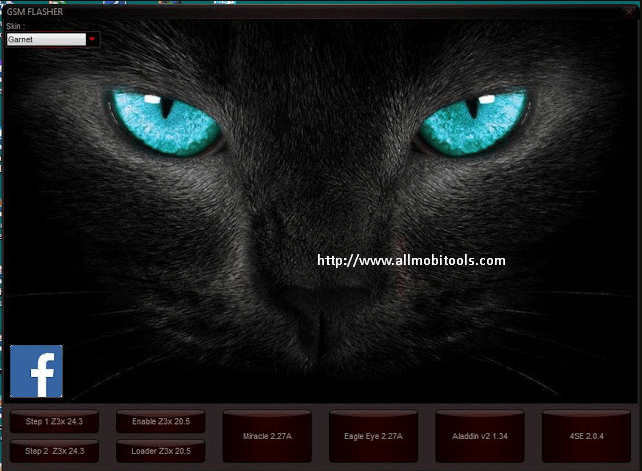
GSM Flasher FRP Tools is a piece of software that lets you remove the FRP lock from Android devices. It gives you a simple and effective way to get around FRP locks, so you can use your device to do things like unlocking, flashing firmware, and more. GSM Flasher Tools is a popular way for Android users and technicians to deal with FRP issues because it is easy to use and has powerful features.
Apps Like FSM Flasher FRP Tools:
Key Features:
GSM Flasher FRP Tools has many features that make it a powerful tool for bypassing FRP on Android devices. Here are some important details:
- GSM Flasher: Bypass FRP Tools let you bypass FRP locks on Android devices without having to use your Google account credentials. This is especially helpful if you forget the password or email for your Google account and can’t get into your device.
- Wide Device Compatibility:
It will work with a wide range of Android devices from Samsung, Huawei, LG, Motorola, and other companies. This makes it a flexible tool that can be used to unlock FRP on different devices. - User-friendly Interface:
It has a simple, easy-to-use interface, so even people who don’t know much about technology can use it. The FRP unlocking process is easy and quick thanks to the step-by-step instructions. - Flash Firmware:
GSM Flasher FRP Tools can do both FRP unlocking and flashing firmware on Android devices. This can help fix devices that have stopped working or update the firmware to the latest version. - Multiple Ways to Unlock FRP:
It will give you more than one way to unlock FRP, like ADB mode, Fastboot mode, and EDL mode, so you can choose the best one for your device and situation.
How to Use GSM Flasher FRP Tool?
Using GSM Flasher FRP Tools is a pretty easy thing to do. Here’s a general guide:
- Download GSM Flasher Tools: Go to the official website of allmobiletools.net or other reliable sites and download the latest version of GSM Flasher Tools.
- Install GSM Flasher Tools by running the downloaded installer on your computer and then following the on-screen instructions.
- Connect Android device to computer: You can connect your Android device to the computer using a USB cable.
- Launch GSM Flasher FRP Tools: Once GSM Flasher FRP Tools is installed, launch it on your computer.
- Choose FRP Unlock Method: From the options in GSM Flasher Tools, choose the right FRP to unlock method (ADB mode, Fastboot mode, or EDL mode) for your device and situation.
Download the GSM Flasher FRP Tool Latest Version
The post All In One GSM Flasher FRP Tools 2025 Free Download appeared first on AllMobileTools-Tutorials, Stock Firmware, Tools, USB Drivers.
]]>