Table of contents
The Account Unlock Tool helps you out in very critical situations, especially when you have been locked out of your own Mi account. This article is written for you if you really want to know exactly how to use it. Below, will tell you exactly how to use Account Unlock Tool, how to download it, and all other important information about this helpful utility. The main purpose of using this tool is to help you gain access to your own Mi account but this does not mean you unlock it; rather, it lets you change all the details stored in your account such as your email ID and password. In addition, if you have reset your password on another device, you can use this tool to bypass that lock and gain access to your account again.
What is Mi Account Unlock Tool?
Mi Account Unlock Tool is a free Windows application that is specially developed to bypass/remove/disable/unlock Mi cloud account verification from all Xiaomi and Redmi smartphones. This is the most secure way to bypass Mi Account without voiding the phone warranty.
Download Mi Account Unlock Tool 2025
| File Name | mi-account-unlock-tool@allmobiletools.net.zip |
| Developer | Mobile Software Advance |
| File Size | 22.61 MB |
| Supported OS | Windows XP, Windows Vista, Windows 7, Windows 8, Windows 10 |
How To Use Mi Account Unlock Tool?
Follow me in the below simple steps to remove/bypass/unlock/disable Mi Cloud Account verification from your Xiaomi Mi smartphones. With the Account Unlock Tool, you can easily factory reset your Xiaomi devices. So let’s get started…
- Download the Account Unlock Tool’s latest version setup from the above link.
- Once downloaded Extract the ZIP file and run the EXE file as administrator.
- Now boot your Xiaomi Mi device into Recovery Mode by pressing and holding the Volume Up+Power key.
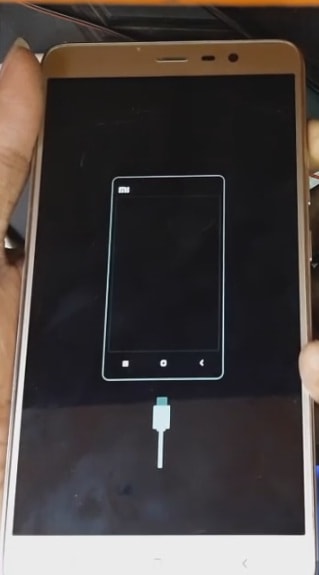
- Now connect your Mi device to your computer VIA USB Cable.
- Open the Mi Account Unlock Tool on your PC and tap on the Information button to confirm whether your device is successfully connected or not.
Note: If you are unable to see your device details on the tool that means your device is recognized by your computer. Install the Xiaomi MI USB Drivers to solve this issue. - Once your device is connected you need to click on the Bypass Mi Account button to remove the mi account from your device.
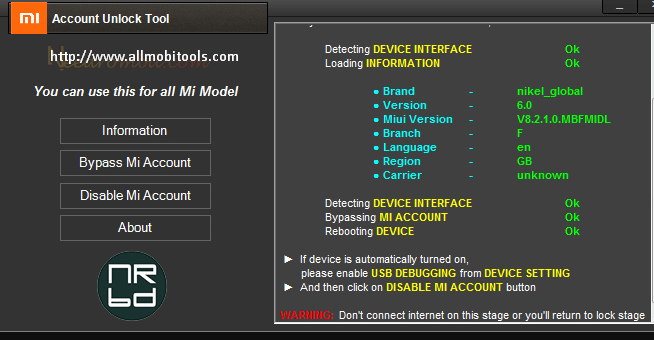
- Your device reboots automatically.
- Done. You have successfully removed Mi Account verification from your Xiaomi device.
Other Xiaomi Tools
Conclusion
The Mi Account Unlock Tool is a powerful and essential software tool for Xiaomi device users who encounter issues with their Mi accounts. It provides a simple and effective way to unlock or bypass Mi account locks, allowing users to regain access to their Xiaomi devices without losing data or factory resetting their devices.
The post Mi Account Unlock Tool 2025 Download Latest (ByPass Mi Account) appeared first on AllMobileTools-Tutorials, Stock Firmware, Tools, USB Drivers.
]]>Table of contents
Also Check: Al In One Android Flash Tool
This tool also allows you to unlock the bootloader on several Xiaomi devices. So before getting started let’s have to talk about its great features. Below is a list of some great features of this amazing tool.
Features Of TPS Xiaomi Tool
- Check full device info.
- Mi Account unlocks in just one click.
- Reboot/backup/restore your device.
- Bypass/Disable Mi account.
- Unlock the bootloader on various Xiaomi devices.
- Screenlock (Sideload).
- More.
The official download link for this tool is provided below. If you are interested in this tool, then follow the link to download the tool for completely free.
Download TPS Xiaomi Tool Latest Version
File Info
| File Name | Details |
|---|---|
| Name | TPS_Xiaomi_Tool |
| Size | 6.5 |
| Developer | Thet Paing Soe |
| Tool Version | v1.0 |
| Download Link | Download TPS Xiaomi Tool ZIP |
Note: if the download doesn’t work or expired, then contact us using the contact form. We will update the link as soon as possible.
The post TPS Xiaomi Tool Free Download Latest Version (2025) | Remove Mi Account appeared first on AllMobileTools-Tutorials, Stock Firmware, Tools, USB Drivers.
]]>Required Files:
List Of Supported Phones:
- Xiaomi Mi Max 2
- Xiaomi Mi 5X
- Xiaomi Mi 6
- Xiaomi Redmi 4X
- Xiaomi Mi 6
- Xiaomi Redmi Note 5
- Xiaomi Mi 5c
- Xiaomi Redmi Note 4X
- Xiaomi Redmi Note 5
- Xiaomi Redmi 4 Prime
- Xiaomi Redmi 4A
- Xiaomi Redmi 4
- Xiaomi Mi MIX
- Xiaomi Mi 5s Plus
- Xiaomi Mi Note 2
- Mi Max Prime
- Xiaomi Redmi 3S Plus
- Xiaomi Mi 5s
- Xiaomi Redmi Note 4
- Xiaomi Redmi 3S Prime
- Xiaomi Redmi Pro
- Xiaomi Redmi 3X etc
How To Use Mi Account Unlock Tool?
- Download Mi Account Unlock Tool from the above link.
- Disable “AntiVirus”. If you have installed AntiVirus on your Computer.
- Now Extract Mi Account Unlock Tool RAR file.
- Open the Extracted folder and RUN “MiAccountUnlock Tool.exe“.
- Now reboot your device into Recovery Mode. “You can boot your device into Recovery Mode by pressing and holding Volume UP Key and Power Key at the same time.
- Now connect your phone to your PC VIA USB Cable.
- You can check your device is connected or not by tapping on the information button.
- Finally click on the “Bypass Mi Account” button to unlock your phone.
- Done. Enjoy!
The post How To Unlock Mi Cloud Account 100% Working Method 2025 appeared first on AllMobileTools-Tutorials, Stock Firmware, Tools, USB Drivers.
]]>