Whatever Huawei model you got, sometimes we get issues while using the phone. And we use to go to the services providers to address those issues. And service providers take advantage of our ignorance towards knowing the depth of the phone and problems, and sometimes we have to pay amounts by getting nothing in the form of services. To address that issue, Huawei Multi-tool software came into the market and blew away all others.
This utility tool helps Huawei users to fix any software issue with their phones.
Table of contents
What is Huawei Multi-tools?
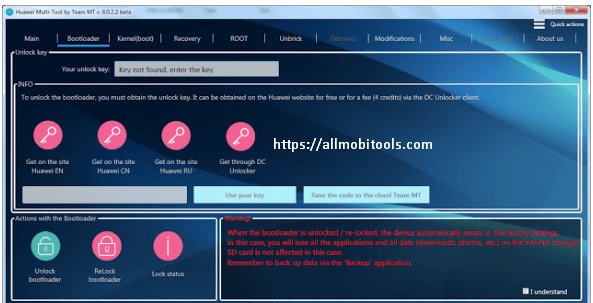
Huawei multi-tools is a simple application that makes you fix any issue with a Huawei smartphone. It is a Windows-based application, and it is based on working with the fast boot and ADB mode of Huawei Honors smartphones.
If you got Kirin or Qualcomm processors, connecting your phone to the computer, where the simple tool is installed can perform many actions.
But, once before getting the use this application, to handle the ROM issues of the phone, must read the instructions or precautions, otherwise, you may get a bricked phone.
For like, you will have to unlock the bootloader of the phone, to get it rooted.
By using the simple Huawei multi-tools you can unlock the bootloader with a couple of taps and clicks.
Install the latest ROM files, custom ROM, and Stock ROMS, or get the latest update to the installed ROM.
Also Check: Huawei Flash Tool (CPU Based)
Get the kernel Issues fixed, root your Huawei Honor smartphones, unbrick the smartphones, and fix more than one issue at one time.
Install Huawei Multi-tools
We have given you the download button to get this tool on your computer.
Remember it is windows utility software, and can only be installed on Windows. To get it used on any other OS, you will have to go through another process.
- Download Huawei Multi-tools software and install it on your Windows computer, no matter, which version of Windows you have installed.
- Get the right USB drivers, as, without the proper USB drivers, your computer may not recognize the phone, which you want to fix.
- And get a USB data cable; connect one side of it to the phone and the other to the computer.
- And launch the tool on your computer
- A new screen will appear, with numerous options to go with
- And according to your suitability and need click on any of it.
- Like, to get a phone rooted, tap on the Root button, and you will be led to a new screen, and by reading the simple commands, one can address the issue easily.
Features of Huawei Multi-tools:
- Update the current OS version of the phone
- Custom firmware install
- Stock Firmware install
- Install DC Unlocker
- Install TWRP
- Get a rooted device
- Enable Super User options
- Installing recovery
- Installing Huawei HI Suite
- Unbricking of the phone
- Reboot to recovery
- Change the language of the phone
- Install Huawei data extractor
- Unlock bootloader
- Firmware or install flashing files
- Reboot to the recover of the phone
Download Huawei Multi-Tool software from the given download link, and install it on your computer.
Download Huawei Multi-Tool Latest Version
| Huawei_Multi_Tools_ZIP | Download MT v8.0.3.9 |
The post Huawei Multi Tool v8 Download Latest Version 2025 [Updated] appeared first on AllMobileTools-Tutorials, Stock Firmware, Tools, USB Drivers.
]]>