What is EDL Point?
EDL Point stands for Emergency Download Mode Point. It is a special mode in Qualcomm-based smartphones that allows users to perform advanced operations, such as flashing firmware or unlocking the bootloader. EDL Point acts as an entry point to the device’s internal programming, bypassing the regular boot process.
Importance of EDL Point
Knowing the EDL Point of your smartphone can be crucial, especially when you encounter software issues or want to modify your device. It provides a way to access the internal system and make changes that are not typically accessible through normal modes like Recovery or Fastboot.
Xiaomi Redmi 7A EDL Point Guide
What is Xiaomi Redmi 7A EDL Point?
The Xiaomi Redmi 7A EDL Point is a specific point on the device’s hardware that, when shorted or connected correctly, forces the phone into Emergency Download Mode. This mode allows you to carry out various tasks like flashing custom ROMs, unbricking the device, or installing software updates manually.
How to Enter EDL Mode on Xiaomi Redmi 7A?
To enter EDL mode on the Xiaomi Redmi 7A, you need to follow these steps:
- Power off your device completely.
- Connect the phone to your computer using a USB cable.
- Open the Xiaomi EDL Mode Tool on your computer.
- Press and hold the Volume Up button and connect your phone to the computer while still holding the button.
- Release the Volume Up button once the phone enters EDL mode.
Step-by-Step Guide to Find Xiaomi Redmi 7A EDL Point
Here is a step-by-step guide to finding the EDL Point on your Xiaomi Redmi 7A:
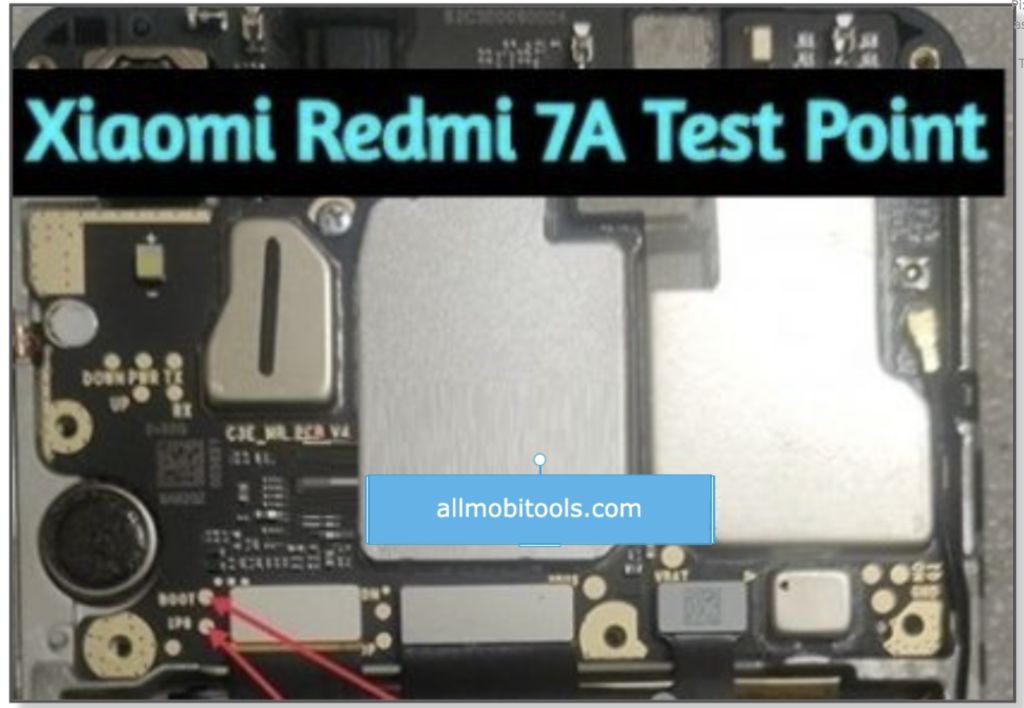
- Ensure your device is powered off.
- Disassemble the back cover of your phone carefully.
- Locate the test points on the motherboard. These are usually labeled as “EDL” or “Test Point.”
- Use a pair of tweezers or a metal conductor to shorten the two test points together.
- Connect your phone to the computer using a USB cable.
- Your Xiaomi Redmi 7A will now enter EDL mode, and you can proceed with the desired operations.
Benefits of Knowing Xiaomi Redmi 7A EDL Point
Knowing the Xiaomi Redmi 7A EDL Point can bring several benefits:
- Software Modifications: With EDL mode access, you can flash custom ROMs, root your device, or install custom recoveries.
- Device Unbricking: If your phone becomes unresponsive or stuck in a boot loop, using EDL mode can help revive it.
- Advanced Troubleshooting: EDL mode allows you to diagnose and fix software-related issues that cannot be resolved through regular modes.
- Manual Software Updates: You can manually install software updates on your Xiaomi Redmi 7A using EDL mode.
Also, Check:
Conclusion
Understanding the concept of EDL Point and specifically knowing the Xiaomi Redmi 7A EDL Point can empower you to perform advanced tasks on your smartphone. However, it is important to note that entering EDL mode and making changes to your device’s software carries risks. It is recommended to research thoroughly, follow reliable guides, and proceed with caution.
The post Xiaomi Redmi 7a EDL Point – Reboot in EDL, Fastboot, Recovery Mode appeared first on AllMobileTools-Tutorials, Stock Firmware, Tools, USB Drivers.
]]>Table of contents
Download TikTok Videos Wintout Watermark
If you want to download videos from TikTok without getting a watermark, you need to try Snaptik, a free video downloader available on Google play. This app is user-friendly and supports multiple devices. You can use it to download videos for offline viewing, editing, and sharing. You won’t have to sign up to use it, so you can save videos to your computer, smartphone, or tablet without any hassle.
Besides allowing users to download TikTok videos without watermark, SnapTik also allows you to save your videos to Facebook or Instagram. This application is available for free on the official website of Snap X. Unlike some other apps, it doesn’t require any software to download and install. It only requires permission from the owner of the video. It’s fast, lightweight, and requires no technical knowledge to use it.
It’s a free online service
You can download the videos from TikTok through a web application, but you’ll need to have a subscription to use them. Fortunately, there’s an easy way to do that. Besides downloading the videos from TikTok, you can also download MP3 audio files. Simply copy the video link and paste it into the download field. You’ll then be able to choose what format you want your video to be and remove the watermark.
The app will automatically detect the video link and show you two options. Either download the video without watermark, or crop it. Then, tap on the tile to view the video and its download history. You can share the video with your friends after you’re done. Once you’re satisfied with the result, tap the “Share” button to share it with your friends.
SnapTik easy to use
You might want to download TikTok videos without the watermark. There are several ways to do this. You can crop out the watermark manually or use video editing software, but it can damage the pixels and ruins the alignment of the video. And it takes time! To avoid these problems, you can use SnapTik – TikTok video downloader without watermark.
Snaptik – TikTok video downloader without watermark works with most popular web browsers. It also protects your videos from sanction and is easy to use. Here are the steps to download TikTok videos without watermark:
SnapTik is fast and Secure
It’s fast video downloader without water mark allows you to save videos in high quality without any watermark or other watermark. This downloader can download videos from YouTube in various formats. It also allows you to download videos in batches and pause/stop downloads. This free downloader has a lot of other handy features, including the ability to choose the resolution of videos, set download speed, and even specify proxy settings.
ByClick Downloader supports downloads from over 900 websites and provides you with two options for downloading: paste the URL or choose one-click mode. The free video downloader also allows you to save your favorite videos in high resolution and with subtitles. It supports downloading from YouTube in high resolutions, and supports multiple download links at the same time. It’s fast and offers many useful features, including support for streaming videos and ripping DVDs.
The post SnapTik App – TikTok Videos Downloader Without Watermark appeared first on AllMobileTools-Tutorials, Stock Firmware, Tools, USB Drivers.
]]>Required Files:
List Of Supported Phones:
- Xiaomi Mi Max 2
- Xiaomi Mi 5X
- Xiaomi Mi 6
- Xiaomi Redmi 4X
- Xiaomi Mi 6
- Xiaomi Redmi Note 5
- Xiaomi Mi 5c
- Xiaomi Redmi Note 4X
- Xiaomi Redmi Note 5
- Xiaomi Redmi 4 Prime
- Xiaomi Redmi 4A
- Xiaomi Redmi 4
- Xiaomi Mi MIX
- Xiaomi Mi 5s Plus
- Xiaomi Mi Note 2
- Mi Max Prime
- Xiaomi Redmi 3S Plus
- Xiaomi Mi 5s
- Xiaomi Redmi Note 4
- Xiaomi Redmi 3S Prime
- Xiaomi Redmi Pro
- Xiaomi Redmi 3X etc
How To Use Mi Account Unlock Tool?
- Download Mi Account Unlock Tool from the above link.
- Disable “AntiVirus”. If you have installed AntiVirus on your Computer.
- Now Extract Mi Account Unlock Tool RAR file.
- Open the Extracted folder and RUN “MiAccountUnlock Tool.exe“.
- Now reboot your device into Recovery Mode. “You can boot your device into Recovery Mode by pressing and holding Volume UP Key and Power Key at the same time.
- Now connect your phone to your PC VIA USB Cable.
- You can check your device is connected or not by tapping on the information button.
- Finally click on the “Bypass Mi Account” button to unlock your phone.
- Done. Enjoy!
The post How To Unlock Mi Cloud Account 100% Working Method 2025 appeared first on AllMobileTools-Tutorials, Stock Firmware, Tools, USB Drivers.
]]>