Table of Contents
What is SP Flash Tool?
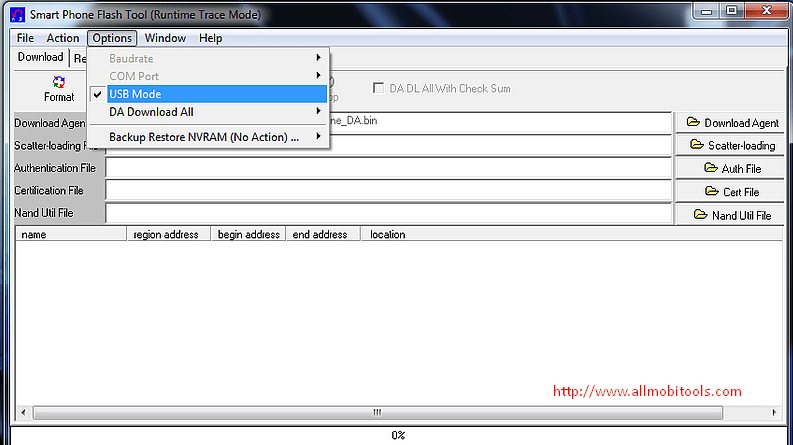
SP Flash Tool, also known as Smart Phone Flash Tool, is a software utility specifically designed for Android devices. It enables users to flash firmware, custom ROMs, recovery images, and other system files onto their Android smartphones or tablets. SP Flash Tool is widely used by both developers and advanced users to perform various tasks, including software upgrades, downgrades, or fixing software-related issues.
How Does SP Flash Tool Work?
SP Flash Tool works by establishing a connection between the computer and the Android device. It uses the MediaTek chipset, which is commonly found in many Android devices. By connecting the device to the computer via a USB cable and launching SP Flash Tool, users gain access to a wide range of functionalities that can help resolve software problems.
Benefits of Using SP Flash Tool
- Flashing Firmware: SP Flash Tool allows users to flash firmware onto their Android devices, which can help fix software-related issues and improve device performance.
- Custom ROM Installation: Advanced users can install custom ROMs using SP Flash Tool to personalize and enhance their device’s functionality.
- Recovery Image Flashing: With SP Flash Tool, users can flash custom recovery images such as TWRP or CWM, enabling them to perform advanced system operations like creating backups or installing modifications.
- Partition Formatting: SP Flash Tool provides the option to format specific partitions on an Android device, which can be helpful in situations where certain partitions are corrupted or causing issues.
Compatibility and Requirements
SP Flash Tool is compatible with devices that utilize MediaTek chipsets. It supports various Android devices from different manufacturers. However, it’s essential to ensure that the specific device model and chipset are supported before using SP Flash Tool. Additionally, users will need a computer running Windows operating system, a compatible USB cable, and the necessary device drivers installed.
SP Flash Tool For Windows PC
| Tool Name | Link |
|---|---|
| SP Flash Tool v6.2316-Latest | Download SP Flash Tool v6.2316 |
SP Flash Tool For Linux OS
| SP Flash Tool Version | Download Link |
|---|---|
| SP Flash Tool v6.2228-Latest | Download SP Flash Tool v6.2228 |
Steps to Install SP Flash Tool
To install SP Flash Tool on your computer, follow these steps:
- Download the latest version of SP Flash Tool from the official website.
- Extract the downloaded file to a location on your computer.
- Locate the extracted folder and run the “flash_tool.exe” file.
- Complete the installation process by following the on-screen instructions.
Using SP Flash Tool to Flash Firmware
To flash firmware using SP Flash Tool, proceed as follows:
- Launch SP Flash Tool on your computer.
- Click on the “Download” tab in the SP Flash Tool interface.
- Load the scatter file associated with the firmware you wish to flash.
- Select the appropriate options based on your requirements.
- Connect your Android device to the computer using a USB cable.
- Click the “Download” button to start the flashing process.
- Wait for the process to complete and a “Download OK” message to appear.
- Disconnect the device from the computer and power it on.
Precautions to Take Before Using SP Flash Tool
Before using SP Flash Tool, it is crucial to consider the following precautions:
- Backup: Create a backup of your important data as the flashing process can erase all data on the device.
- Device Compatibility: Ensure that your device is compatible with SP Flash Tool and that you have the correct firmware and scatter file.
- Battery Level: Charge your device to a sufficient battery level before initiating the flashing process to avoid any interruptions.
- Follow Instructions: Carefully follow the step-by-step instructions provided by the firmware provider or official sources to minimize the risk of errors.
Troubleshooting Common Issues
In case you encounter any issues while using SP Flash Tool, consider the following troubleshooting tips:
- Reinstall Drivers: If your device is not recognized by SP Flash Tool, reinstall the necessary drivers on your computer.
- Try Different USB Port/Cable: Sometimes, a faulty USB port or cable can cause connection issues. Try using a different USB port or cable to establish a stable connection.
- Check Scatter File: Ensure that the scatter file used matches your device’s firmware. Using an incorrect scatter file can lead to compatibility issues.
- Retry the Process: If the flashing process fails, try repeating the process from the beginning, ensuring that all steps are followed accurately.
Frequently Asked Questions (FAQs)
Q: Is SP Flash Tool compatible with all Android devices?
A: No, SP Flash Tool is compatible only with Android devices that have MediaTek chipsets. Ensure compatibility before using it.
Q: Can SP Flash Tool remove the network lock on a device?
A: No, SP Flash Tool is primarily used for flashing firmware and other system files. Unlocking network locks requires different methods.
Q: Can SP Flash Tool be used on Mac or Linux systems?
A: No, SP Flash Tool is designed for Windows operating systems and doesn’t have official versions for Mac or Linux.
Q: Is it safe to use SP Flash Tool?
A: When used correctly and with caution, SP Flash Tool is safe. However, improper use or flashing incompatible firmware can lead to device issues.
Q: Where can I download SP Flash Tool?
A: You can download the latest version of SP Flash Tool from the official website of the developers or reputable Android forums.
Conclusion
SP Flash Tool is a valuable utility for Android users, allowing them to resolve software-related issues, flash firmware, and perform advanced system operations. Its compatibility with MediaTek devices and extensive range of features make it a popular choice among developers and advanced users. However, it is essential to follow instructions carefully, ensure device compatibility, and take necessary precautions to avoid any potential risks.
Best Alternatives
The post SP Flash Tool v6 Download Free 2025 – All MTK Flash Tool [Updated] appeared first on AllMobileTools-Tutorials, Stock Firmware, Tools, USB Drivers.
]]>